


 by
by Why Ubuntu 24.04 Source Configuration Changed
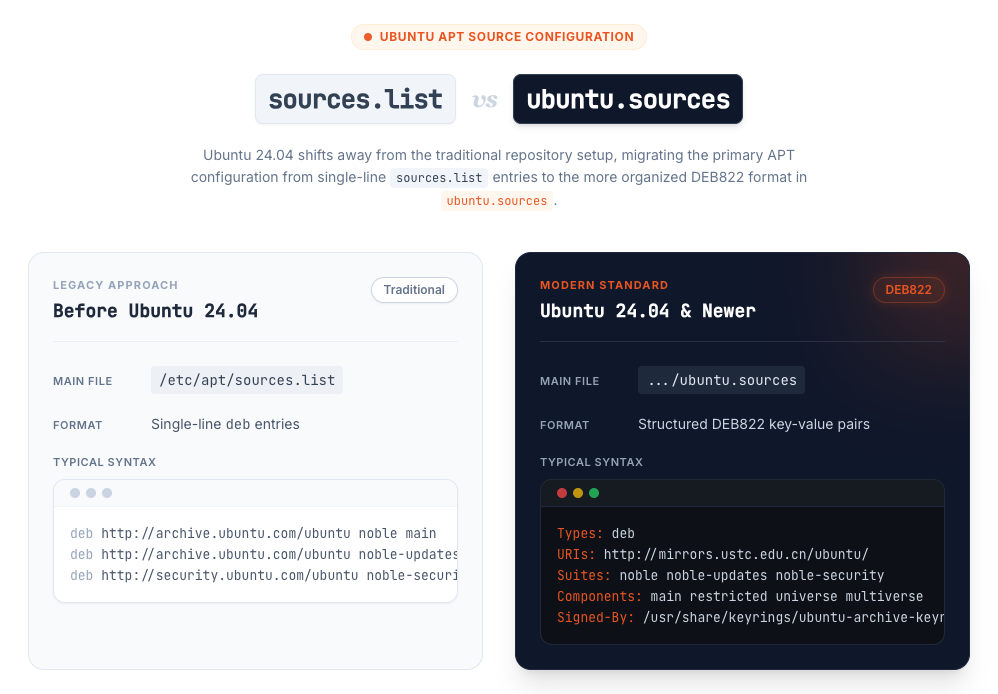
Starting with Ubuntu 24.04, the default APT source configuration is no longer mainly managed through the traditional /etc/apt/sources.list file. Instead, Ubuntu now uses a DEB822-style source definition stored in a .sources file.
This change makes the source configuration more structured and easier to extend. Compared with the old one-line deb entries in sources.list, the DEB822 format is more explicit and readable, with fields such as Types, URIs, Suites, Components, and Signed-By.
For users upgrading from older Ubuntu releases, this can be a little confusing at first. Many tutorials still tell you to edit /etc/apt/sources.list, but on Ubuntu 24.04, the main source configuration is usually handled through ubuntu.sources instead.
Because of this change, switching to a mirror in China on Ubuntu 24.04 is slightly different from the old workflow. The idea is still the same, but the file format and file location are no longer what many older guides describe.
Where Ubuntu 24.04 Stores APT Sources
On Ubuntu 24.04, the default repository configuration is typically stored in:
/etc/apt/sources.list.d/ubuntu.sourcesThis file replaces the older approach where most users directly edited /etc/apt/sources.list.
If you want to switch to a faster mirror, such as a mirror in China, this is usually the file you need to modify. In most cases, you can either edit it manually or replace it with a preconfigured version.
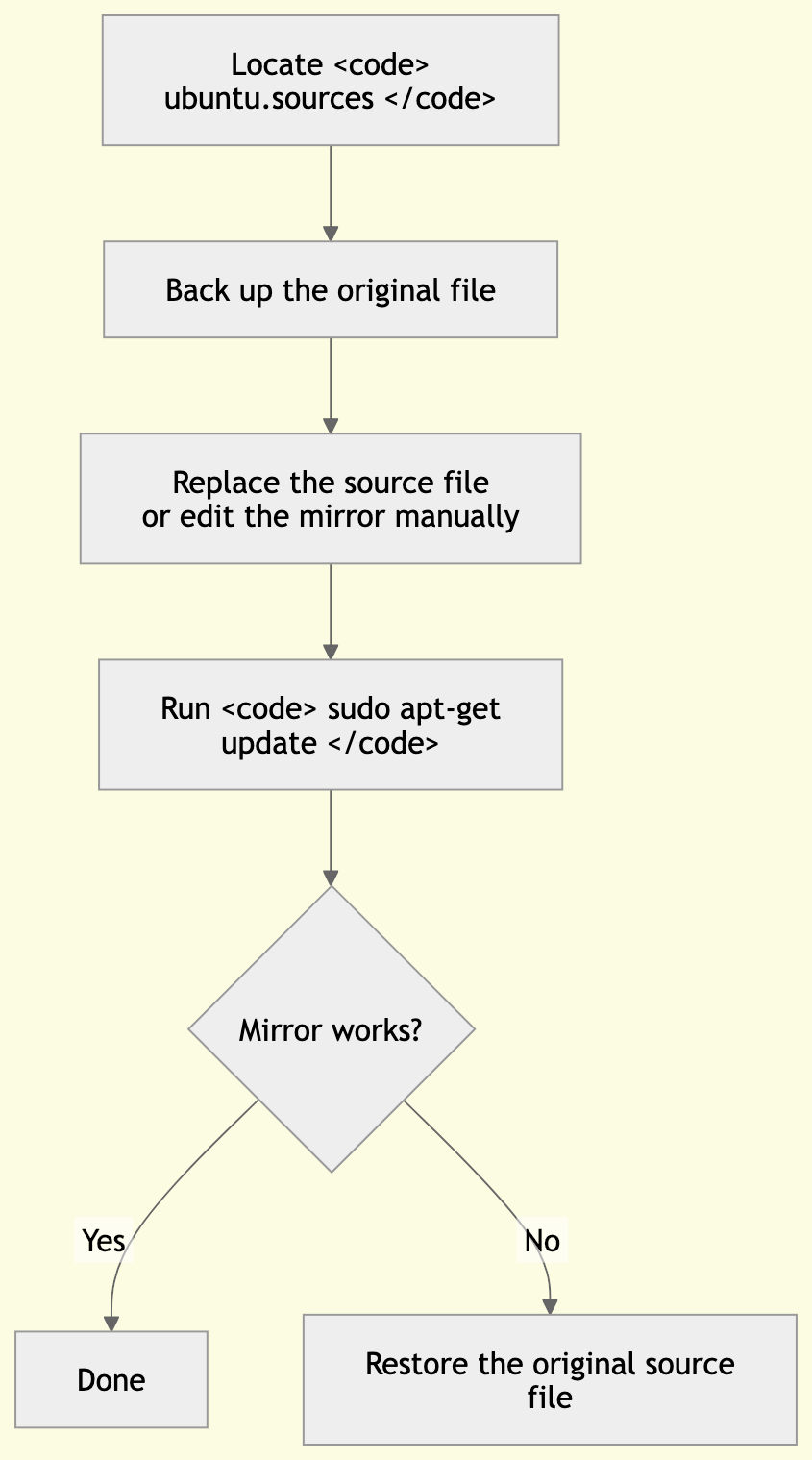
Before making any changes, it is a good idea to back up the original file first. That way, you can easily restore the default configuration if something goes wrong.
How to Replace the Default Ubuntu Mirror
Replacing the default Ubuntu mirror on Ubuntu 24.04 is still a simple process, but the configuration file is now different from what many older tutorials describe. Instead of editing /etc/apt/sources.list, you will usually work with /etc/apt/sources.list.d/ubuntu.sources.
There are two common ways to switch mirrors. You can either replace the file with a preconfigured version, or edit the file manually and change the mirror URL yourself. Before doing either one, it is strongly recommended to create a backup of the original file.
Back Up the Original Source File
Before making any changes, create a backup of the current source configuration:
sudo cp /etc/apt/sources.list.d/ubuntu.sources /etc/apt/sources.list.d/ubuntu.sources.bakThis gives you a safe restore point in case the new mirror does not work as expected or you want to revert to the default configuration later.
Replace the Source File with a Preconfigured Mirror
If you already have a ready-to-use source file, you can download it and overwrite the existing one directly. For example:
curl your-preconfigured-file-server/sh/ubuntu.source | sudo tee /etc/apt/sources.list.d/ubuntu.sourcesThis is the fastest option if you trust the source file and want to complete the switch in a single command.
That said, you should always review third-party source files before using them on your system. If you are not sure what the file contains, editing the configuration manually is the safer and more transparent approach.
Edit ubuntu.sources Manually
If you prefer to update the mirror yourself, open the source file with your editor of choice:
sudo vim /etc/apt/sources.list.d/ubuntu.sourcesThen replace the URIs field with the mirror you want to use. A typical example looks like this:
Types: debURIs: http://mirrors.ustc.edu.cn/ubuntu/Suites: noble noble-updates noble-securityComponents: main restricted universe multiverseSigned-By: /usr/share/keyrings/ubuntu-archive-keyring.gpgIn this format:
Typesdefines the package source typeURIsspecifies the mirror addressSuiteslists the enabled release channelsComponentsdefines the repository sectionsSigned-Bypoints to the keyring used to verify packages
For most users, the only field that needs to be changed is URIs.
Update the APT Package Index
After saving the file, refresh the package index so APT can load packages from the new mirror:
sudo apt-get updateIf the command runs successfully, the new mirror is now active. You can then continue installing or upgrading packages as usual.
If you run into connection errors or repository issues after switching, double-check the mirror URL and the contents of the ubuntu.sources file. If necessary, restore the backup and try a different mirror.
Popular Ubuntu Mirrors in China
If the default Ubuntu mirror is slow or unstable from your network, switching to a local mirror in China can significantly improve package download speed and update reliability.
On Ubuntu 24.04, most mirror changes only require updating the URIs field in the ubuntu.sources file. The rest of the configuration usually stays the same.
Below are some commonly used Ubuntu mirrors in China.
USTC
The University of Science and Technology of China mirror is one of the most widely used options:
Types: debURIs: http://mirrors.ustc.edu.cn/ubuntu/Suites: noble noble-updates noble-securityComponents: main restricted universe multiverseSigned-By: /usr/share/keyrings/ubuntu-archive-keyring.gpgThis mirror is a solid default choice for many users.
Tsinghua TUNA
Tsinghua University’s TUNA mirror is also a popular and reliable option:
Types: debURIs: http://mirrors.tuna.tsinghua.edu.cn/ubuntu/Suites: noble noble-updates noble-securityComponents: main restricted universe multiverseSigned-By: /usr/share/keyrings/ubuntu-archive-keyring.gpgIf one mirror feels slow from your location, trying another is often the easiest fix.
Aliyun
Aliyun provides a commonly used commercial mirror for Ubuntu packages:
Types: debURIs: http://mirrors.aliyun.com/ubuntu/Suites: noble noble-updates noble-securityComponents: main restricted universe multiverseSigned-By: /usr/share/keyrings/ubuntu-archive-keyring.gpgThis can be a convenient option if you prefer a large cloud provider mirror.
NetEase 163
The NetEase 163 mirror is another familiar option for users in China:
Types: debURIs: http://mirrors.163.com/ubuntu/Suites: noble noble-updates noble-securityComponents: main restricted universe multiverseSigned-By: /usr/share/keyrings/ubuntu-archive-keyring.gpgWhen choosing a mirror, there is no single best option for everyone. Performance can vary depending on your ISP, region, and network conditions. If one mirror does not work well, try another and run sudo apt-get update again to test it.
Restore the Original Source File
If the new mirror does not work properly, or if you simply want to go back to the default configuration, you can restore the backup you created earlier.
Run the following command:
sudo cp /etc/apt/sources.list.d/ubuntu.sources.bak /etc/apt/sources.list.d/ubuntu.sourcesThen refresh the package index:
sudo apt-get updateThis will restore the previous source configuration and make APT use the original repositories again.
Restoring the backup is usually the quickest way to recover from problems such as connection failures, invalid repository settings, or an incorrectly edited ubuntu.sources file. That is why creating a backup before making any changes is strongly recommended.
Final Thoughts
Ubuntu 24.04 changes the way APT sources are configured, but switching to a mirror in China is still straightforward once you know where the new file is. If your package downloads are slow, updating
ubuntu.sourcesand choosing a faster local mirror can make daily package management much smoother.